Gameplay · November 4, 2026
Moonlighter 2 Stuck Enemies and Softlocks: How to Protect a Run
If you have had to abandon a Moonlighter 2 run three quarters of the way through, you are not alone. Since late October, the busiest threads on the game's Steam discussion board have been about run-ending bugs: enemies stuck in the air, enemies you cannot hit, and rooms that stay locked after the last enemy is gone. A November 2 review describes exactly that case, a flying enemy that stopped attacking and would not land while the player had run out of gun ammo. As of November 4, 2026, the newest patch notes on Steam are still the version 1.0 Hotfix 1 from September 14, 2026. Until something newer ships, the useful question is how to stop a bug from costing you the backpack.
What players are reporting right now
These are player reports from Steam reviews and discussions posted in late October and early November 2026. They are not confirmed by the developers, and some may depend on platform or timing, but they come up often enough to plan around.
- Flying enemies stuck in the air that stop attacking and never land, leaving the room locked.
- Enemies standing on the floor next to Will that cannot be hit by the melee weapon or the gun, with the gun aiming at other enemies instead.
- Rooms with no enemies left that still do not let you progress, reported two or three levels before the boss.
- In Aeolia, riding the ziplines in quick succession or with many enemies on screen, after which Will could not attack, dodge or interact.
- Getting stuck in a falling animation in the Greed arena with a backpack full of relics.
- The Kalina Night Realm boss getting stuck in his ground pound animation with the damage pool beneath him.
- Controller drift in menus, and on keyboard and mouse the roll occasionally stopping working.
- A console player reporting that the A and + buttons stopped working after porting home from a boss fight.
What Hotfix 1 already fixed
Before you assume your problem is new, make sure you are on Hotfix 1. The September 14 notes fixed a spot in Kalina where players could fall out of the map with no way to recover the run, Will getting stuck behind an obstacle in the Gallery area, the CH4 Turret getting stuck in its shooting animation after being tased, spearhead projectiles freezing in midair when reaching Will, and Sergeant Roberto not reacting when shot from a distance. It also restored Barrier Blessing shield charges when retrying a dungeon. The developers said they would bring these fixes to the console versions as soon as possible and then assess balancing and gameplay.
Earlier Early Access patches also addressed similar failures, including a soft lock when stepping into the Greed Colosseum and The Curator boss sometimes stopping responding and becoming invincible. The pattern matters: the team has fixed bugs when reports named the exact enemy, spot and situation. None of the reports listed above appears in a patch note yet, so for now you need a plan for when one happens to you.
Rule one: the pendant is your bug insurance
Compare that with the cost of a death. On Easy, Normal and Hard, dying halves the quality of every relic in the backpack. On Expert you lose those relics outright, and on Hardcore a death costs your progress and starts the journey over. We have not found an official statement about what abandoning a run does to your backpack, and players who abandoned describe it as losing the run. Treat the pendant as the known-safe exit. If an enemy is hovering and not attacking, or the doors stay shut after the last enemy falls, give it a short moment, try the obvious answers once, and then pendant out if the bag is worth more than the rest of the run.
Keep gun ammo for flying enemies
The gun rides alongside your melee weapon, and it is the main way to hit anything that is not on the ground. The November 2 review that sparked this guide ended because the player had no ammo left when the flying enemy got stuck. Going into later rooms, especially in a region with flyers, keep a few shots in reserve instead of emptying the gun on targets your melee weapon can already reach.
This is not a guarantee. One discussion report describes an enemy on the floor that neither the weapon nor the gun could hit, so ammo will not save every broken room. It does turn some stuck-enemy situations from a forced exit into a few seconds of shooting, and it costs you nothing in fights you would have won anyway.
Routes and terrain to treat carefully
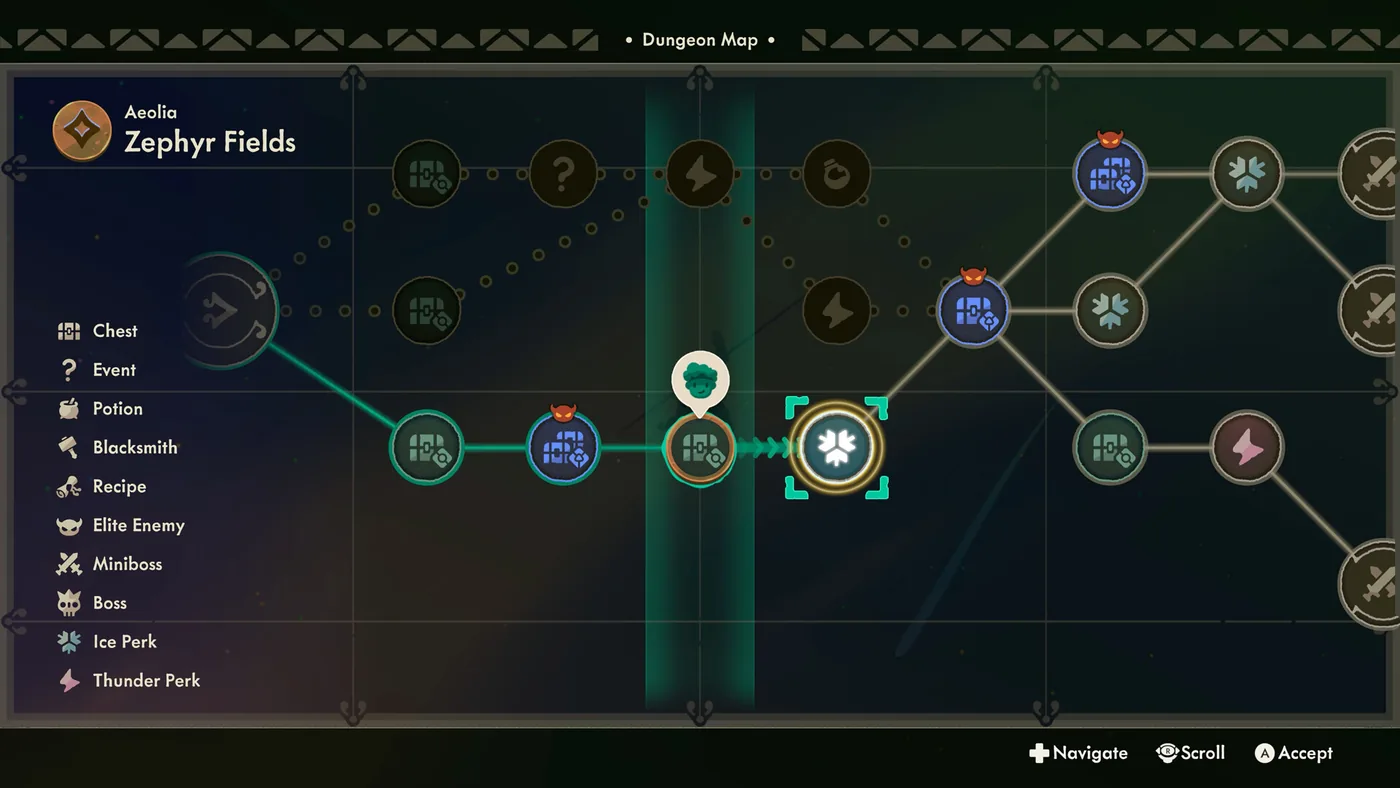
The dungeon map is your best planning tool. The official screenshot of Aeolia's Zephyr Fields map shows a legend for chests, events, potions, the blacksmith, recipes, elite enemies, minibosses, bosses and perk rooms. Before you enter a section with an elite or a miniboss, decide in advance where you will pendant out if something goes wrong. One player in the bugs thread also noted that the potion symbol on the map does not match the icon in the map key, so read the node itself, not only the legend.
Zephyr Fields is the zipline region, with wind traps and ziplines throughout. Given the report of a lockup after chaining ziplines quickly with many enemies on screen, clear the enemies around a zipline before you ride it and do not trigger several in a row at full speed. Treat the Greed arena and the Kalina Night Realm boss with the same caution when you are carrying a valuable bag. The safest moment to extract is before the door, not after the bug.
Fix the technical side first
Some run losses are crashes rather than logic bugs, and recent reviews mention long loading times and crashes during dungeon runs on PC and Steam Deck. The pinned Tech Support and Known Issues thread from 11 bit studios lists the official steps. If the update is not showing, exit and fully close Steam, then relaunch. For freezing, lag or crashes on PC, reinstall your GPU driver cleanly with Display Driver Uninstaller, disable overlays such as Steam, Discord, GeForce Experience or AMD Radeon, turn off overclocking tools, and verify the integrity of the game files.
On Steam Deck, the thread recommends setting all graphics options to Low and restarting the game, with Antialiasing set to FSR3 and the upscaling preset on Balanced or Quality. If you use a PS4 or PS5 controller but see Xbox button prompts, disable Steam Input. On PC, Hotfix 1 also added a DirectX 11 and DirectX 12 option, which is worth comparing if crashes keep ending runs.
Report it so it can be fixed
The pinned thread asks players to email [email protected] rather than relying on forum replies, and says reports do not have to be written in English. Include the platform, the dungeon and floor, the enemy or terrain involved, your weapon, gun and active perks, and what you did right before the bug. Hotfix 1's notes name specific enemies and exact spots, which suggests that precise reports are the ones that turn into fixes.
Related Moonlighter 2 guides
Moonlighter 2 Beginner Guide: First Runs, Sales and Upgrades
A fact-first Moonlighter 2 beginner guide covering dungeon runs, relics, shop prices, and village reinvestment.
Moonlighter 2 Dungeon Guide: Routes, Combat and Run Decisions
A Moonlighter 2 dungeon guide grounded in the Steam description: route planning, relic collection, backpack space, and escalating rewards.
Moonlighter 2 Shop Guide: Stock, Selling and Reinvestment
A source-tracked Moonlighter 2 shop guide covering player-set prices, customers, decorations, perks, and village investment.