Gameplay · November 4, 2026
Moonlighter 2 Bloblets: How to Rescue, Adopt and Activate Them
Bloblets are the small shop companions Moonlighter 2 added in the Blob-Life Balance Update on May 20, 2026, and they remain one of the least explained systems in version 1.0. An October Steam discussion thread asked the question many players run into: the shop describes effects such as more tips for a short time or better sales for a few items, but when do they start, and how do you trigger them? The answer from other players is that you pet the Bloblet in your shop. This guide walks through the whole loop as the developers described it, from earning the currency in the dungeons to adopting at the pet seller in Tresna and timing the effect on the shop floor.
Where Bloblets come from
The Blob-Life patch notes describe Bloblets as a new system that affects both parts of the game loop. In the dungeon, you complete Bloblet challenges to earn a new currency. Back in Tresna, you exchange that currency for new Bloblets at the pet seller, which the same notes list as the vendor where you rescue and adopt Bloblets. The May patch notes name the seller Zane Jane, while the version 1.0 Hotfix 1 notes refer to Hazy Jane, the name our character page uses.
Hotfix 1 also confirms that the challenge lives inside the dungeon: it fixed the dungeon music not restarting after the Bloblet room if you left before its track ended. In practice, a Bloblet challenge is a room on your route, not a menu in town. When one appears, judge it the way you would judge any optional node, against the health you have left and the relics already in your backpack. The same hotfix fixed a loss of player input when talking to Hazy Jane during later stages of the game, so if the vendor froze your controls before September 14, 2026, update the game before assuming your save is broken.
How to activate a Bloblet in the shop
The Blob-Life notes say that once you unlock Bloblets at the pet seller, you can equip a Bloblet for the shop run, and it grants special effects until you close the shop. What the notes do not spell out, and what confused the October thread, is the trigger. Players answered that you use the Bloblet by petting it, and one reply added that this step is not covered in the tutorial, which explains why so many people equip one and never see anything happen.
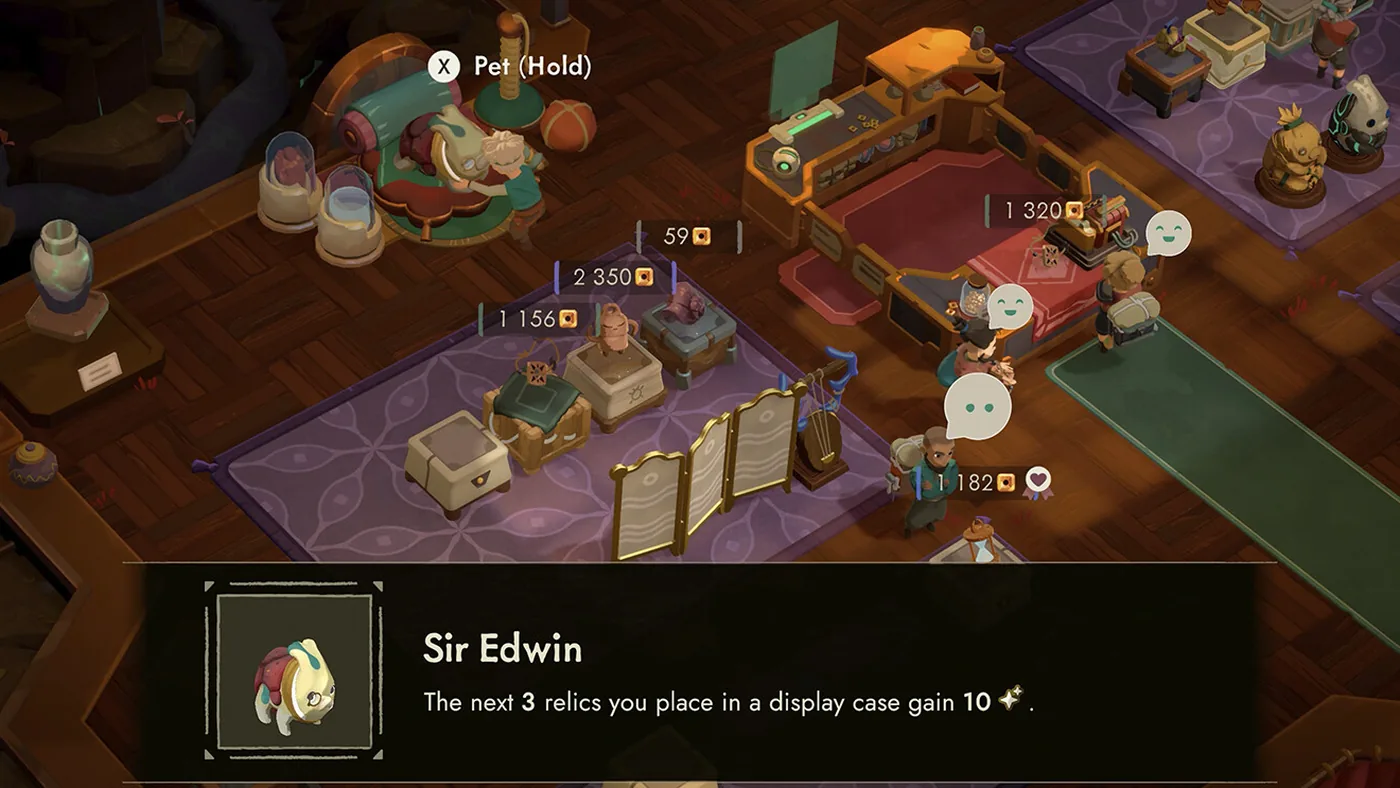
One of the official Steam store screenshots shows the interaction directly. A companion named Sir Edwin rests on a cushion in the shop with a Pet (Hold) prompt above it. The tooltip at the bottom of the screen says the next 3 relics you place in a display case gain 10 of the value marked by a sparkle icon. So the input is a hold, not a tap. Walk up to the Bloblet, hold the interact button shown on screen until the prompt completes, and read the effect text: it tells you exactly what the next stretch of your shop will receive.
Time the pet, not just the equip
The developers describe the bonuses as temporary, naming increased relic value and better customer tips as examples. That makes timing more important than the choice of companion. Sir Edwin's effect counts the next three relics placed in a display case, so the sensible order is to pet first and then place the relics you most want to boost. If you fill the cases with cheap filler right after petting, the count is spent on items that barely matter.
The thread starter described other effect texts in two shapes: a short window of more tips, and a set number of items that sell for more money. A window effect is wasted in an empty shop. Wait until customers are already browsing or lining up before you hold the prompt. A count-based effect is the opposite: it does not expire while you wait, so line up your most valuable relics first. The same screenshot shows a Tip Value counter in the top-left corner of the shop screen, which is the easiest place to check whether a tip effect is actually doing something during your session.
Combine Bloblets with Aromas and price hints
Aromas arrived in the same Blob-Life update. After you sell some relics at a Cheap price, a machine in the shop drops a random Aroma from three possible options, and you can apply it to a showcase for passive effects until the end of the shop run. When the developers ran a shopkeeping contest after the update, they explicitly asked players to put Bloblet effects and Aromas to work together, so treat them as one shop-floor toolkit rather than two separate systems.
The update also added price hints. When you know the price ranges above and below the one you are setting, an indicator shows whether it lands in Cheap, Perfect, Expensive or Overpriced, and a question mark appears when you do not know the ranges yet. A hint also appears when a price is so far from fair that no customer will be interested. Keep that discipline even with a Bloblet active: a value or tip bonus cannot rescue a relic that nobody will buy at the price on its tag.
More room for Bloblets as the shop grows
Shop Level 4 also came with the Blob-Life update. The September 2, 2026 version 1.0 launch post then added Shop Level 5, which gives you an additional Bloblet slot so you can bring more companions along, plus a new cosmetic placement slot for another decoration. Neither post prints the total number of slots, the unlock cost, or how many Bloblets exist in total, so do not trust a guide that quotes those numbers as official.
Collecting them all: what the achievements show
In the Early Access progress post that previewed the feature, the developers named skins such as Rumblet, Guyblob Threepup and Mr. Spots while the assets were still marked as work in progress, and said the skins would increase item value and alter sell prices. Treat those names as previews. If the collector achievements matter to you, take Bloblet rooms whenever the route and your health allow it, and spend the currency at the pet seller between runs instead of letting it pile up.
Quick Bloblet checklist
- Clear Bloblet rooms in dungeons to earn the Bloblet currency.
- Adopt at the pet seller in Tresna (Hazy Jane in the Hotfix 1 notes).
- Equip a Bloblet for the shop run; its effect lasts until you close the shop.
- Hold the Pet prompt to trigger it. The tutorial does not explain this step.
- For count-based effects, pet first, then place your best relics.
- For time-window effects, pet when customers are already in the shop.
- Shop Level 5 adds one more Bloblet slot, according to the version 1.0 launch post.
Related Moonlighter 2 guides
Moonlighter 2 Beginner Guide: First Runs, Sales and Upgrades
A fact-first Moonlighter 2 beginner guide covering dungeon runs, relics, shop prices, and village reinvestment.
Moonlighter 2 Dungeon Guide: Routes, Combat and Run Decisions
A Moonlighter 2 dungeon guide grounded in the Steam description: route planning, relic collection, backpack space, and escalating rewards.
Moonlighter 2 Shop Guide: Stock, Selling and Reinvestment
A source-tracked Moonlighter 2 shop guide covering player-set prices, customers, decorations, perks, and village investment.